- Published on
Running a docker image on a Synology NAS without a registry
- Authors

- Name
- Matt Du-Feu
- @mattdufeu
I've built a little web app that I want to run on my Synology NAS. I'm already running a couple of docker containers on it, so I thought I'd containerise my app and do the same.
Normally I'd have to publish the image to a registry and then download it from there. I didn't want to do that. I was about to run my own registry on the NAS like https://dev.to/kedzior_io/setup-a-docker-registry-on-synolgy-aia when I noticed you can also import an image from a file:
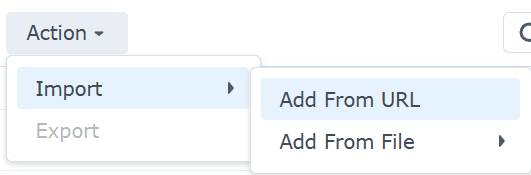
You can import from a file on the local machine or the NAS. Perfect.
So my workflow is:
- Build the docker image
- Save the docker image with
docker save -o my-app.tar my-app:latest - Synology Container Manager -> Image -> Action -> Import -> Add From File -> From local device
That's it! Create the container and run it as any other image.
Not automated, but I can live with that.